
What it does
Voice notes to Notion become usable pages, not raw transcripts.
With voice notes to Notion, a spoken idea becomes a titled, structured page instead of a raw transcript. Aureon shows the draft and destination before anything is written. It adds the approved page without changing existing Notion content.
A quick recording captures the thought, but not the work around it: where it belongs, what the title should be, or how someone will scan it later. Rebuilding that structure by hand is often slower than saying the idea.
Aureon handles that middle step. Speak naturally, check the title and sections, then decide whether the page is ready. If you are learning how to use Notion effectively, fast capture helps only when the result is easy to find and reuse.
Aureon is create-only by default: it adds new items, never sends messages or emails for you, and does not delete or reorganize content you already have.
Why it works
Voice to text for Notion should shape the thought—not just transcribe it.
Speech recognition alone is not enough. The useful part is a page you can understand, place, and trust.
Talk through the idea
Start with the substance. Pauses, restarts, and loose ordering can stay in the spoken input while Aureon identifies the title, headings, and key points.
Get a page-shaped draft
The preview shows the proposed page and destination together, so missing context is visible before the page reaches your workspace.
Make the final decision
Approve the draft when it is accurate, or stop and revise it. Aureon's Notion action is limited to creating a new page, so established content stays as it is.
Connect Notion
How to connect Aureon to Notion and create a page by voice.
Open Notion Connections
Open the Notion Developer portal at Connections, then select New connection.
Open Notion ConnectionsScreenshot
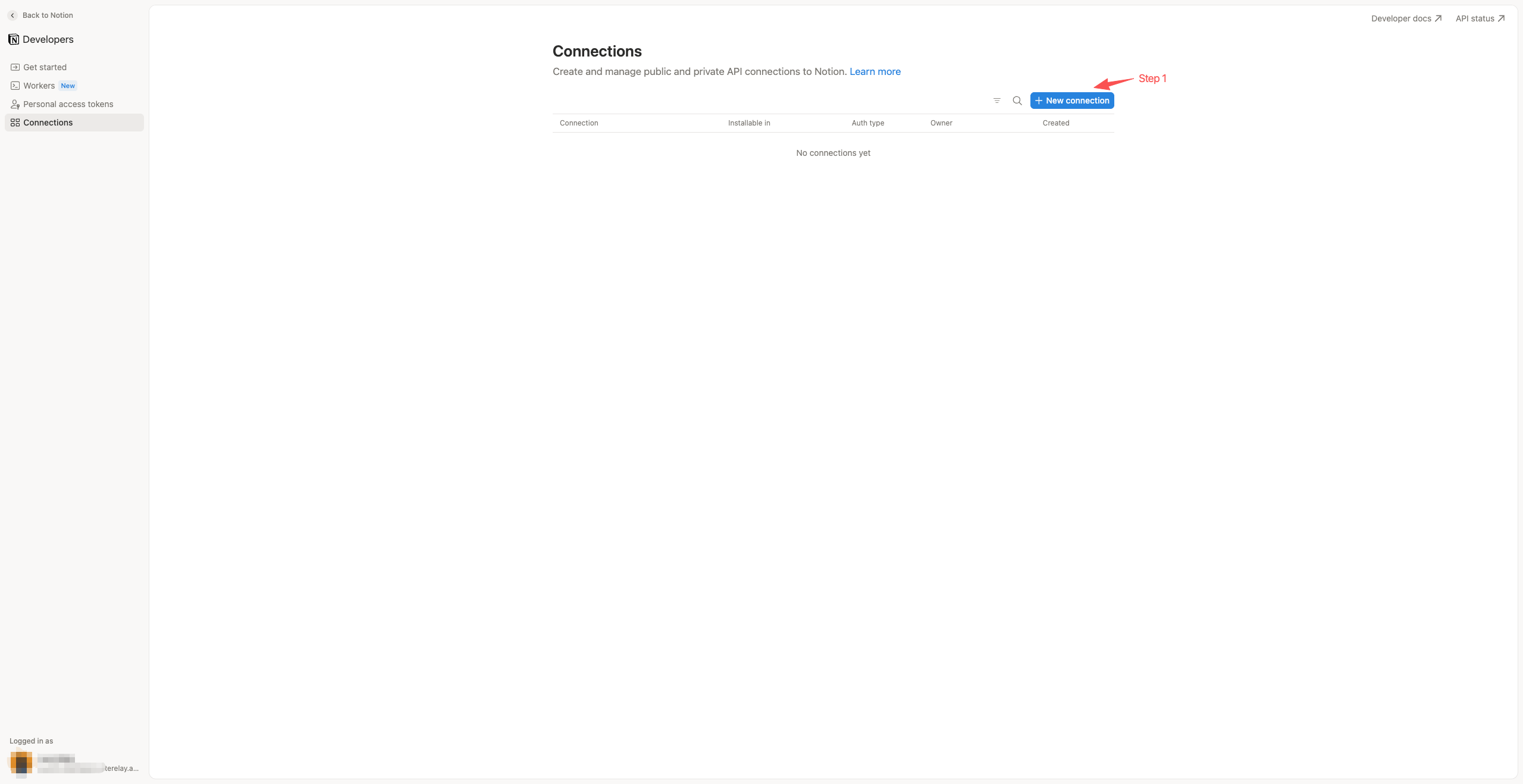
Create an internal access-token connection
Enter Aureon as the name, choose Access token, select the correct workspace under Installable in, and create the connection. It stays private to that workspace.
Screenshot
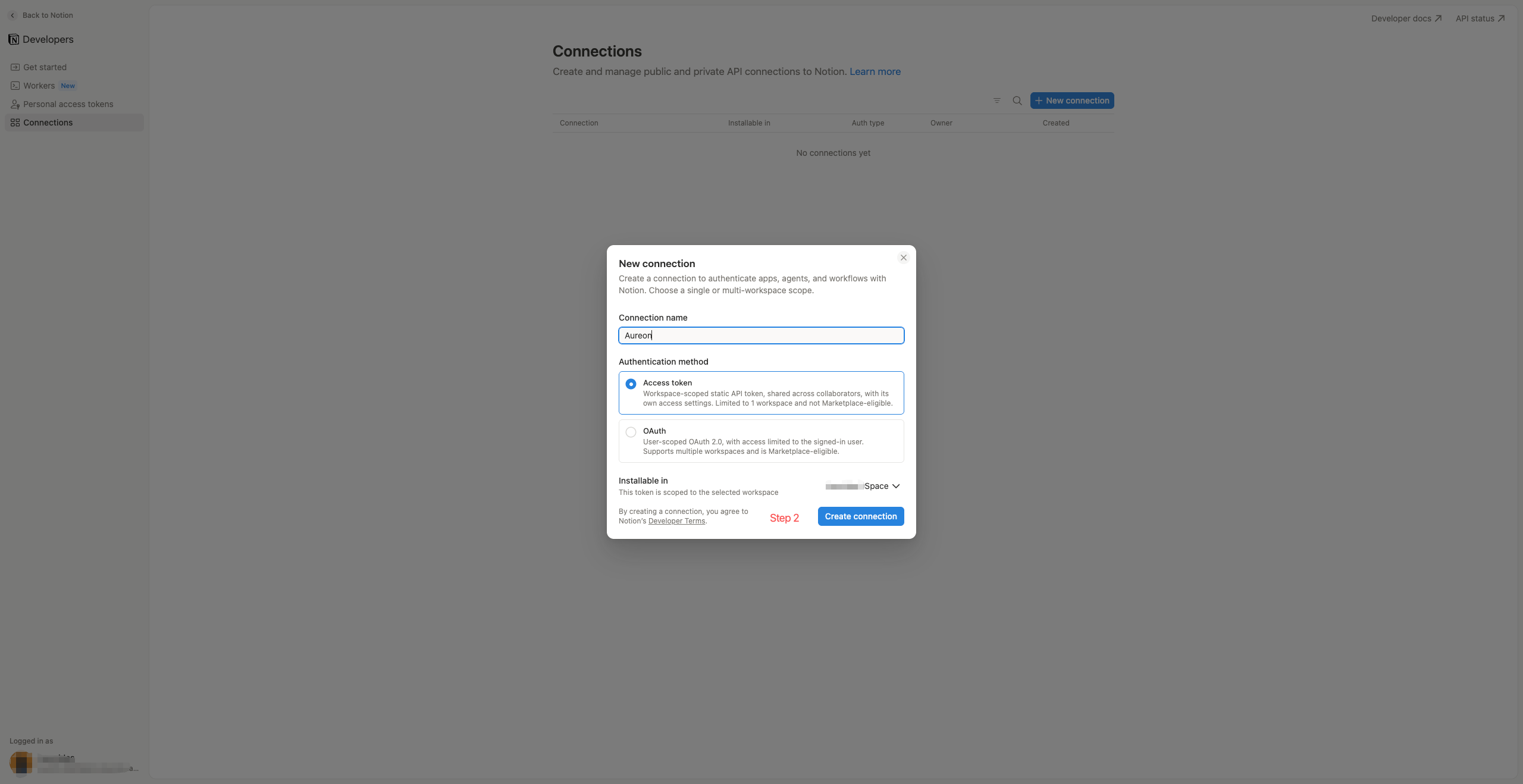
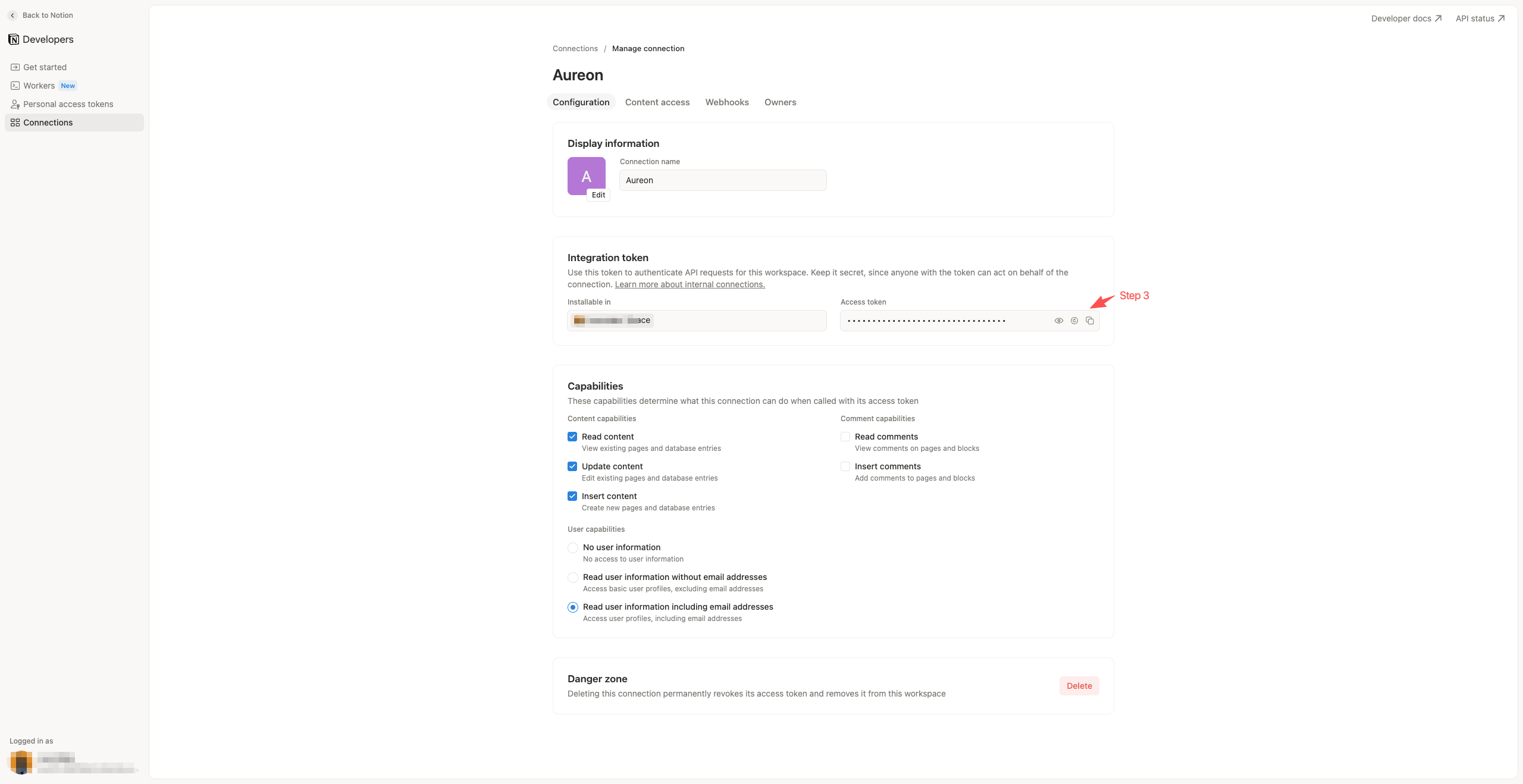
Copy the token and set minimum permissions
On Configuration, copy the access token and keep it private. In Capabilities, turn on only the access Aureon needs to find the destination and add a page.
Screenshot
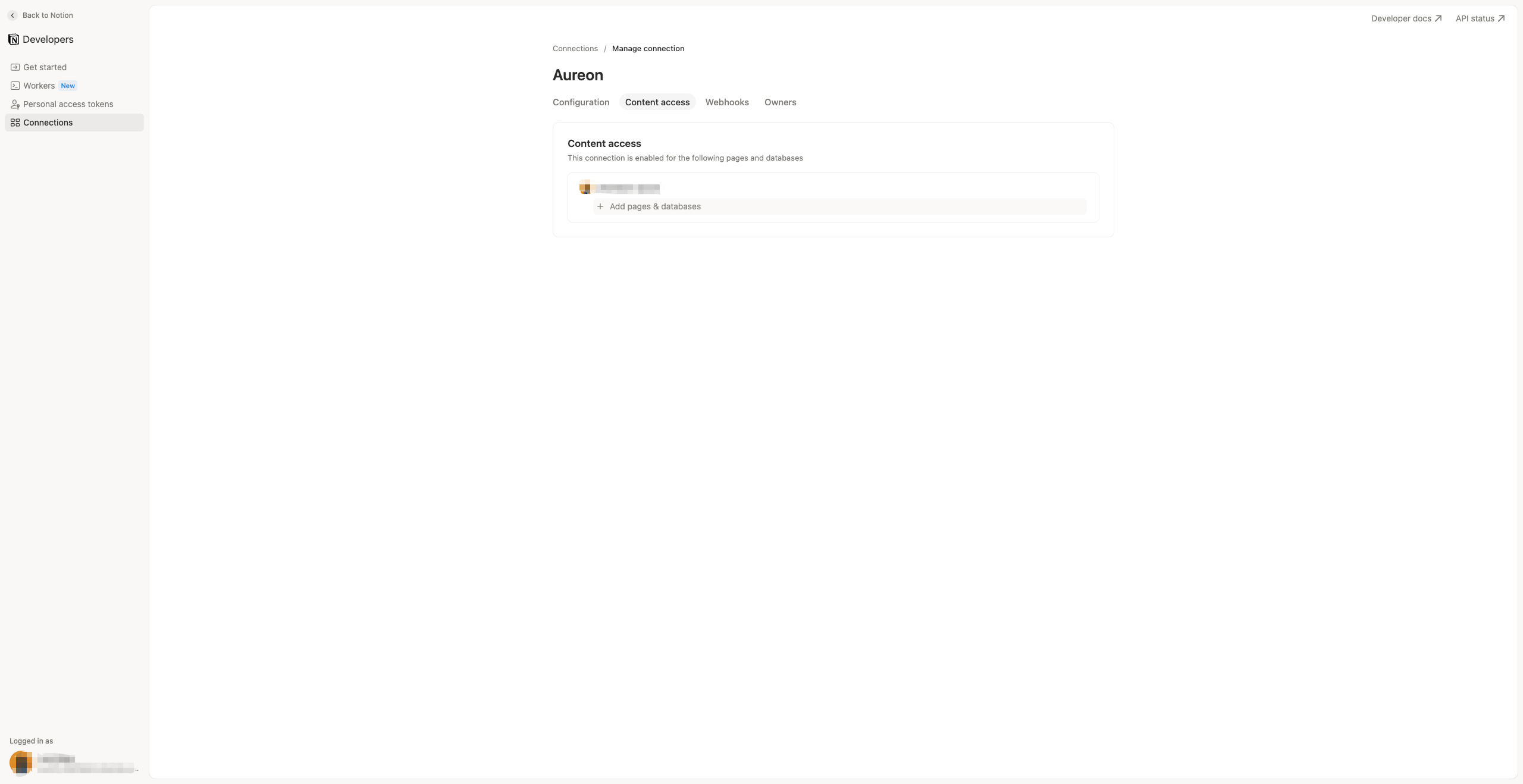
Authorize the Inbox in Notion
Open Content access and select Add pages & databases. Add the page or database that will serve as Aureon's Inbox. This grants the connection access; you will select that same destination inside Aureon in the final step.
Internal connections need explicit content access. The page or database does not become Aureon's Inbox until you choose it in the app.
Screenshot
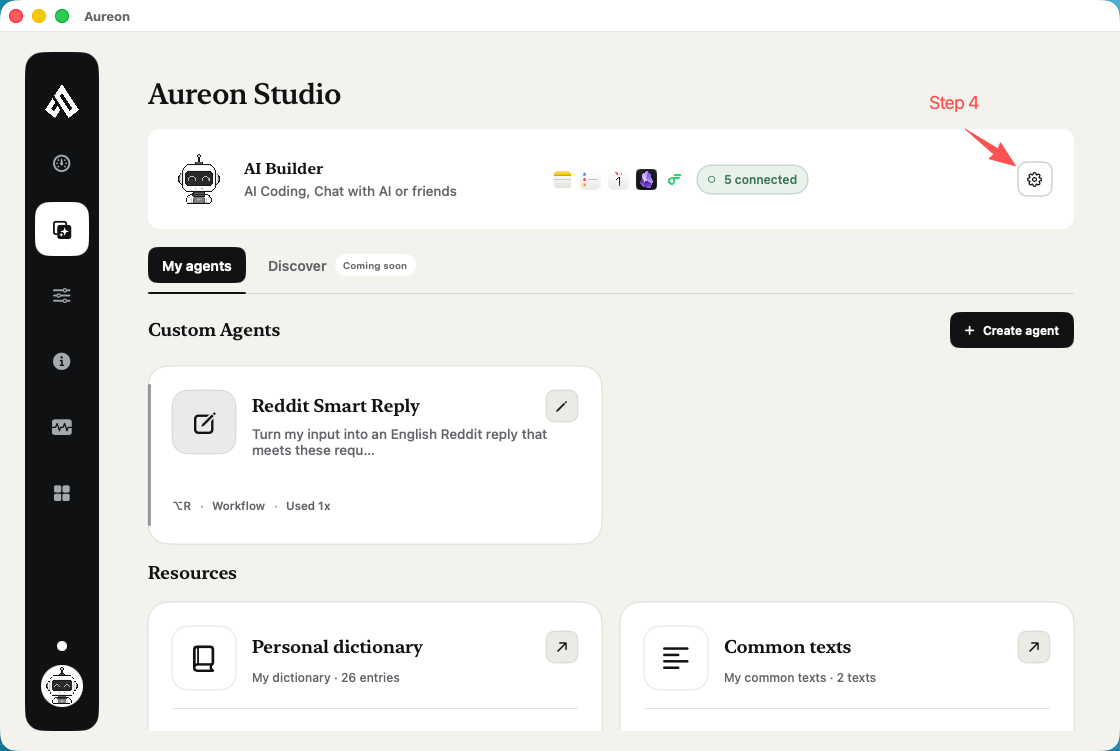
Open the Notion connector in Aureon
In Aureon Studio, open AI Builder settings and select Notion.
Screenshot
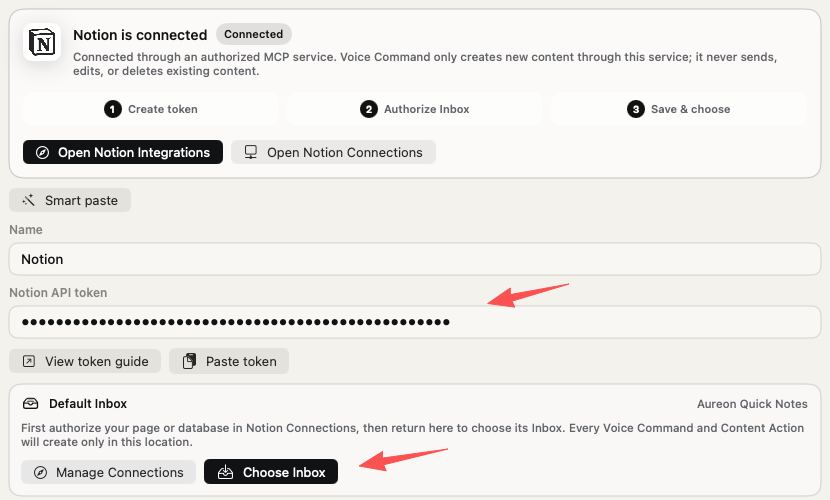
Save the connector, then choose its default Inbox
Paste the token and select Save Connector. Once Notion is connected, find Default Inbox, select Choose Inbox, and choose the page or database you authorized in Notion. Aureon uses it as the fixed location for new pages created by Intent Cast and Smart Actions.
Keep the token private. If the authorized destination does not appear, return to Manage Connections, add it under Content access, then try Choose Inbox again.
Screenshot
Create pages after setup
Two ways to create a new Notion page with Aureon.
Use Intent Cast when the idea is in your head. Use Smart Actions when the useful material is already on screen. The shortcuts below are the Aureon defaults; if you changed them, use your saved shortcut instead.
Method 1 · Intent Cast
Speak a Notion page with Option–Shift.
This is the direct voice notes to Notion path. Say what the page should contain; Aureon uses the configured Default Inbox and prepares the new page for review.
Default shortcutOptionShift
Method 1 · Intent Cast
Speak a Notion page with Option–Shift.
This is the direct voice notes to Notion path. Say what the page should contain; Aureon uses the configured Default Inbox and prepares the new page for review.
- Open Intent Cast
Press Option–Shift. The compact Intent Cast bar appears, so you can keep working in the app already in front of you.
- Say what the page should contain
Try: “Create a Notion page for today’s product idea. Use a title, summary, and next steps.” Aureon uses the Default Inbox selected in the connector settings.
- Review, then create
Check the proposed title, page content, and Notion destination. Approve it when those details are right; Aureon then creates the new page.
Method 2 · Smart Actions
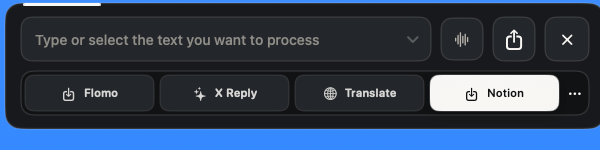
Turn selected text into a Notion page with Control–Shift.
Use this path for an article excerpt, research note, email, or other text already on screen. Set up the Notion action once, then reuse it from the Smart Actions palette.
Default shortcutControlShift
Method 2 · Smart Actions
Turn selected text into a Notion page with Control–Shift.
Use this path for an article excerpt, research note, email, or other text already on screen. Set up the Notion action once, then reuse it from the Smart Actions palette.
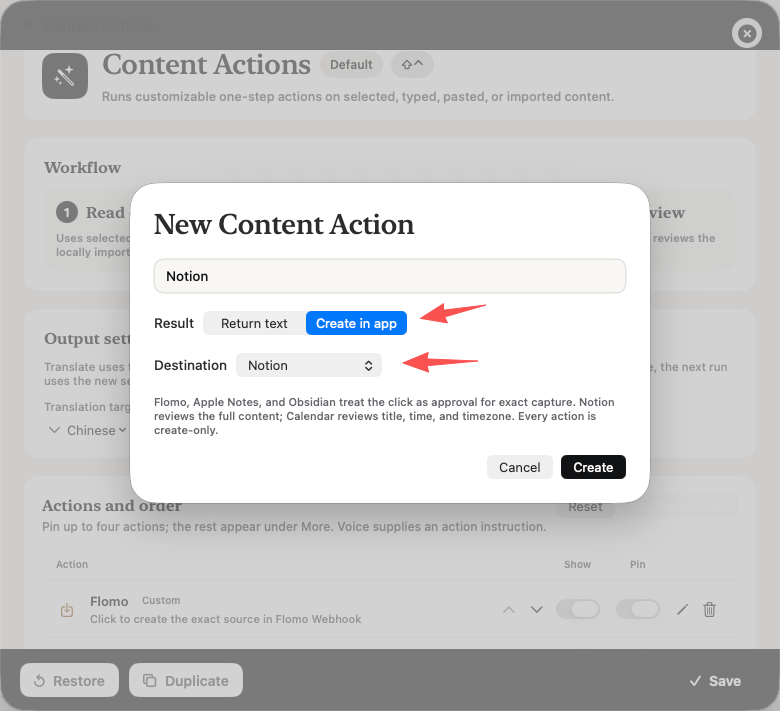
- Add Notion as an action
Open Smart Actions settings and select New action. Name it Notion, choose Create in app, set Destination to Notion, then create and save the action.
- Select the source text
Highlight the passage you want to keep in a webpage, document, or supported Mac app. Keep the selection focused on material that should belong together on one page.
- Open Smart Actions
Press Control–Shift and choose Notion from the action row. If Notion is not pinned, open More to find it.
- Review the proposed note
Aureon turns the selected text into a proposed new Notion page. Check the title, content, and destination before approving the create action.
One shared result
Both paths end with a separate new Notion page.
Whether the input began as speech or selected text, Aureon shows the proposed page before creation. The approved result becomes its own page instead of changing content that is already in your workspace.
In everyday use
Three voice notes that are better as Notion pages.
These are good voice-to-text for Notion tasks: each thought needs a clear home and light structure, but not an edit to an established page.
Project kickoff
Voice: new page for the Q3 launch—goals, risks, and who owns each workstream.
New page: Q3 Launch Goals / Risks / Workstream owners
Use this when you know the subject but have not yet built the brief.
Meeting follow-up
Voice: create a Notion page for today's customer call with the decisions, open questions, and next steps.
New page: Customer Call Follow-up Decisions / Open questions / Next steps
The call gets its own follow-up page instead of changing an established account record.
Idea capture
Voice: save a page for the onboarding idea—show new users the first successful workflow before asking them to configure anything else.
New page: Onboarding Idea First-value workflow / Why it matters / Open questions
The point is not perfect prose. It is preserving the idea in a page that is readable when you return to it.
Choose by the job
Choose Intent Cast for ideas and Smart Actions for selected text.
Both Aureon paths create a reviewed new page. The right choice depends on where the information starts: in your head, on your screen, or in a layout you need to control by hand.
| Use case | Intent Cast | Smart Actions | Build it by hand |
|---|---|---|---|
| Starting point | An idea you want to speak | Text already selected | A blank Notion page |
| Default shortcut | Option–Shift | Control–Shift | None |
| Best for | Briefs, follow-ups, and new ideas | Research, excerpts, and material on screen | Precise layouts and deep editing |
| Review | Title, content, and destination | Title, content, and destination | You build and check as you go |
| Result | Approved new Notion page | Approved new Notion page | Manually created page |
Sources checked: Notion: Internal connections, Notion: Connection capabilities, Notion: Personal access tokens.
Use your judgment
Where this Notion workflow fits—and where it does not.
Use Aureon to start a page from speech. Keep manual control when the job involves revising, appending to, or reorganizing information that already exists.
Best fit
Starting from a blank page
- Project briefs from rough thoughts
- Meeting follow-ups
- Ideas you want to revisit
Use carefully
Placement
- Confirm the Default Inbox in settings
- Review dates, names, and facts
- Check the page structure before creating
Not the job
Editing your workspace
- Editing existing pages
- Appending to an existing page
- Overwriting, moving, or reorganizing content
Before relying on it
Questions about voice notes to Notion.
Short answers about setup, shortcuts, permissions, and the limits of this workflow.
01Can I turn voice notes into Notion pages on Mac?
Yes. Choose a Default Inbox in the Notion connector, then speak the note. Aureon prepares a structured page and shows the destination for review before adding it to Notion.
02How does voice to text for Notion work in Aureon?
Aureon turns spoken input into a proposed title and page structure rather than leaving you with a raw transcript. The preview lets you check both the content and its destination before approval.
03Can Smart Actions save selected text to Notion?
Yes. Add a Smart Action with Create in app as the result and Notion as the destination. Select text, press Control–Shift, choose Notion, then review the proposed page before creating it.
04How do I connect Notion to Aureon?
Create an access-token connection in Notion and authorize the page or database that should receive new pages. Paste and save the token in Aureon, select Choose Inbox, then choose that same authorized destination as the Default Inbox.
05What Notion permissions does Aureon need?
An internal connection needs Read content, Insert content, and access to the chosen parent page or database. Select that authorized destination as the Default Inbox in Aureon. Leave Update content, comments, and user information off; Aureon does not need them for this workflow.
06Can Aureon edit or append to existing Notion pages?
No. The current Notion connector creates new pages only. It does not append to, edit, overwrite, move, or reorganize existing content.
07Why can’t Aureon find my Notion destination?
Open the connection's Content access tab in Notion and add the target page or database. Then return to Aureon, confirm the token is saved, select Choose Inbox under Default Inbox, and choose that authorized destination.